SmartProbe: What We've Been Building

What's new, feature by feature
Every major area now follows the same pattern: a Hub that opens on an overview you can manage from, and a separate Settings page for setup. Forms open as slide-over panels, so you never lose your place on the page behind them.
Dashboard
Rebuilt dashboard widgets and figures, including a restored and faster Latest Probe Readings widget.
Click a probe in Latest Probe Readings to open its logs with the last 24 hours already loaded.
Cook Chill, Food Safety and Delivery figures on the dashboard now match their hubs exactly.
A quick action to record a delivery straight from the dashboard.
Devices and Locations
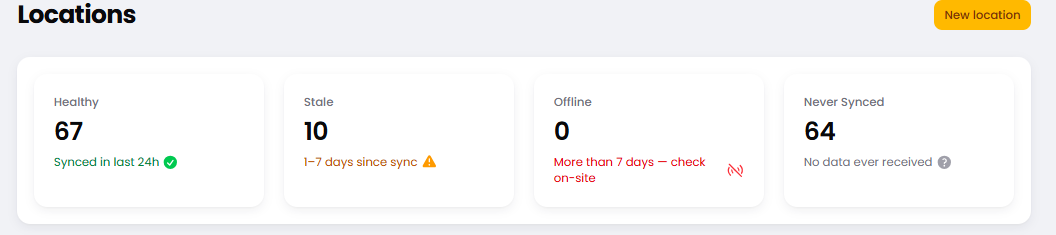
Your device list now answers the question that matters: is this probe reporting?
Each location has its own profile page, with its tablet details in one place.
Operating hours: a probe can be set to working hours, so out-of-hours readings stay out of your audit exports.
Calibration intervals are now set per device, so six-monthly and twelve-monthly schedules are both handled correctly.
Calibration certificates are now proper PDFs, fixed at the moment they are issued.
Cook Chill
A new Cook Chill Hub opens on an overview a manager can prove compliance from.
Batches pass or fail only on real probe readings, never on estimates. Reading gaps are graded fairly at both ends.
A failed batch raises a corrective action automatically.
A manager can review and sign off a batch the readings could not verify, with the reason recorded.
Completed batches are locked as they were left, and can no longer be deleted.
Less tapping on the floor: an optional category picker when starting a batch, and a confirmation once it has started.
Custom Processes
Build your own monitored processes beyond cook chill, now in the Cook & Chill menu (marked Testing while we finish it).
Runs are graded on readings, with failures followed up automatically.
Staff start a run with one choice; managers get a run list and printable run pages.
Spot Checks
A rebuilt Spot Check page, with each check marked pass or fail against food safety limits.
You can tighten those limits for your business, but never loosen them below the standard.
We record who last edited a spot check, and deleting a food or category no longer removes its history.
Food Safety and Checklists
Guided setup with starter packs aligned to FSANZ, plus a setup checklist so nothing is missed.
A new Food Safety overview for managers, showing what is due, where and when, including missed checks.
Checklists are scheduled by location, and every expected check is recorded. A missed check now shows as missed rather than disappearing.
When an answer fails, staff are asked what they did about it.
Photo and signature requirements are enforced.
Kiosk mode for kitchen devices: a manager hands the screen over to the kitchen from the dashboard, and the rest of the account stays locked.
Reporting: a compliance report, an inspector pack, CSV exports, a weekly summary email and failure alerts.
Every checklist run prints with its full evidence: limits, pass/fail, photos, signature and sign-off.
Deliveries
A new Delivery Hub with setup moved to Delivery Settings.
Record a delivery from a slide-over, with several items sharing one temperature reading.
Each item can carry a required temperature range. An out-of-range arrival is flagged and raises a corrective action.
A printable receiving temperature log.
Temperature Checks
Temperature checks are now recorded evidence, not a one-tap sign-off.
Fewer steps: no separate load step and no typing the period in.
Overnight check windows now work, and a check counts towards the window that is due.
A new Alerts Hub, with check schedules moved into Alerts.
Incidents and Corrective Actions
Each incident now records its peak temperature, its site, how it ended, and its corrective action.
Managers can triage and export incidents by site.
One open corrective action per fridge, rather than one for every excursion.
Verify many corrective actions at once. Actions can never be lost or quietly rewritten.
Alert emails link straight to their incident.
Alerts and notifications
Every alert SMS is kept to a single, clear message, with the detail and a link in the email.
Offline alerts are now one per device per day, not one for every dropout.
One incident per stalled tablet, rather than one for every probe on it.
No more pages for impossible readings, or repeat texts about a problem you already know about.
Missed-check alerts can now go by SMS.
People are only alerted about sites they can see, and only while they are part of your team.
Activity Log
A tamper-proof log of what your team does in SmartProbe: sign-ins, role changes and key actions, kept for seven years.
Faster everywhere
We went page by page looking for wasted work, and removed it. The result is quicker loading across the busiest parts of SmartProbe.
Fewer database trips. Device lists, temperature checks and spot checks no longer look things up one row at a time. Spot checks now run within a fixed query budget.
Less background noise. Cook Chill and Custom Processes no longer write a log entry every few seconds for every open batch, and viewing a Cook Chill page no longer triggers grading work for other accounts.
Leaner charts. Incident charts are capped at a sensible number of points and no longer refresh themselves constantly.
Smarter tablet syncing. Tablets no longer get locked out by their own security checks, and battery levels are only stored when they actually change.
Leaner logs. We cut unbounded internal logging, which keeps the system responsive as your history grows.
Safer, more accurate and more reliable
Your SmartProbe records are evidence for inspectors and auditors. A lot of our work went into making sure that evidence is accurate, complete and protected.
Security and access
We completed a full security review of how access is controlled across sites and teams, and closed every issue it found.
Site managers now see only their own sites: their checklists, temperature checks, incidents and the people who work there.
Managers can no longer widen their own access, or anyone else's.
Every download is checked against the specific record requested, not just your membership of the account.
Kiosk screens stay locked to the kitchen's own tasks after a hand-over.
We keep our software and its components up to date with security patches.
Accurate records
Correct local times everywhere. All times are stored in one standard and shown in the local time of the site they describe. A probe that moved between sites keeps its past readings in the time zone where they were taken.
Exact export date ranges. Exports filtered by date no longer drop readings near midnight.
Evidence is locked. Completed batches, corrective actions and checklist runs can't be quietly edited or deleted.
Incident start times are fixed. We found and repaired a fault that could change when an incident appeared to have started.
Future-dated readings are rejected. A tablet with a wrong clock can no longer add readings dated in the future.
Celsius throughout, removing any risk of a mixed-up unit.
Reliability
Buffered readings from a tablet that was offline no longer set off old alerts when it reconnects.
We now detect a tablet failure that nothing could previously see.
Nightly backups have been reorganised, with your long-term readings history archived separately.
Updates go through automated checks before they reach the live system, and a failed update can no longer leave SmartProbe in maintenance mode.
What's coming next
We're not slowing down. Several new features are already being built, and we'll share details as each one is ready.
Retiring the legacy system by the end of 2026. Every site will run on the new SmartProbe platform, with one set of records and one place to manage them.
A new dedicated home for SmartProbe. We're moving to a dedicated Laravel hosting platform (Laravel Forge). It gives us closer monitoring of errors and faster fixes, often before you notice anything.
Custom Processes, out of testing. Monitor any process your kitchen runs, beyond cook chill, with the same evidence-grade grading.
Building management system integration. Live probe data feeding directly into the building management systems used by larger sites and estates.
AI insights. AI built into SmartProbe to spot patterns in your temperature data and compliance records, and surface what needs your attention.
Barcode scanning for deliveries. Scan items as they arrive to record a delivery faster, with fewer typing mistakes.
Checklists that work offline. Kitchen screens that can keep going when the Wi-Fi drops.
We also keep improving the features you already use. Most of the changes in this post started with feedback from customers. If something in SmartProbe slows you down, or there's something you wish it did, tell us. Reply to this post or get in touch with our support team.
Thank you for being part of SmartProbe.